[ Setup article ]

How to Set Up DKIM for Marketo?

1 min readBy Team EA

Marketo admin menu showing Email settings

DomainKeys Identified Mail (DKIM) is an anti-tamper protocol that ensures the security of your emails  in transit. The DKIM standard uses digital signatures to check that the email was sent by a specific domain.

After you successfully set up DKIM for Marketo, it will automatically sign all outgoing mails with a shared Marketo signature.

To set up DKIM for your domain, follow these steps :

  • Log in to your Marketo account and go to the Admin section.
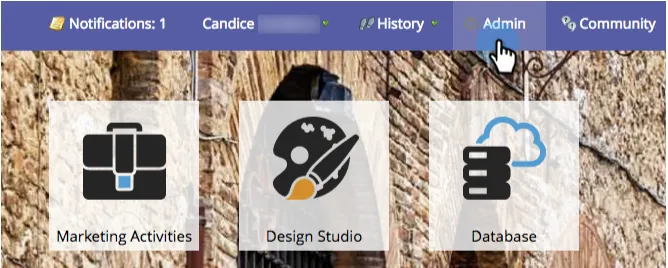
    Marketo admin menu showing Email settings
  • Click on ‘Email’. Go to the  DKIM tab and subsequently click on ‘Add Domain’.
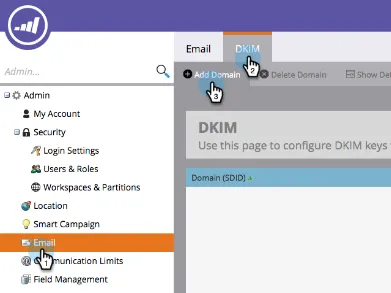
    Marketo Email menu with DKIM highlighted
  • Add the domain of your choice.
  • Copy the Hostname and record value as shown in the image below and add it to your DNS management console. Wait for 24-48 hours for the changes to take effect.
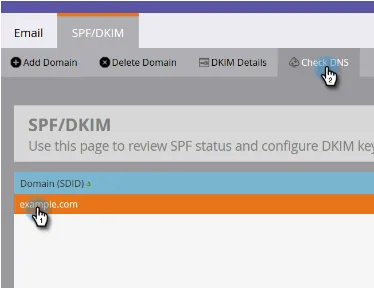
    Marketo SPF/DKIM page with Add Domain highlighted
  • Once you have done that, come back to Marketo and click on ‘Check DNS’. You will see a confirmation if you have set up the records on your DNS correctly.

Check and verify your DKIM records using our free DKIM validator tool.

[ DKIM guide ]

Part of the Knowledge BaseSending-service implementation guides · 365 guides

Enterprise provenance

Why top financial institutions and governments retired their email security dashboards.

Traditional email authentication platforms sell you a dashboard and ask your engineers to do the labour. In high-stakes environments, manual oversight means delayed enforcement, configuration drift and unmonitored shadow domains.

EmailAuth is the agentic email provenance platform. Our agents enforce p=reject, keep third-party senders aligned and move your domains to full RFC 9989 compliance, the new DMARC standard,, with human-in-the-loop auditability.

Governments Large enterprises Tier-1 financial institutions

SaaS · Dedicated tenancy · Air-gapped on-prem · BYOK encryption

[ Keep reading ]

All posts