DomainKeys Identified Mail (DKIM) is an anti-tamper protocol that ensures your mail remains secure in transit. DKIM uses digital signatures to check that the email was sent by a specific domain. Set up DKIM manually on your Mandrill account to start signing your outbound emails with DKIM keys.
Steps to set up DKIM on Mandrill
- Before you can enable DKIM signatures on Mandrill, you will need to add your Domain Name to Mandrill.
- Login to your Mandrill account and under ‘Settings’, go to ‘Domains’.
- After entering your Domain name, click on ‘Add’.
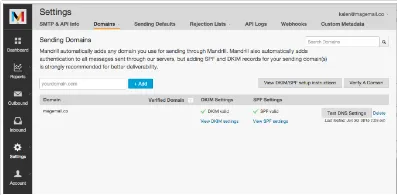
- After adding your domain name, click on ‘View DKIM settings’. You will see the DNS records that you need to publish in your DNS management console.
Mandrill._domainkey.yourdomain.comv=DKIM1; k=rsa; p= (your unique DKIM key ) - Publish the DNS records and wait for up to 48 hours for the changes to take effect.
- Click on the ‘Test DNS Settings’ button in your DNS management console and check for a verification mark against your record.
Check your DKIM record using EmailAuth’s free DKIM validator tool.