[ Setup article ]

DKIM Setup for Freshdesk

1 min readBy Team EA

Freshdesk email settings showing SPF and DKIM records

DomainKeys Identified Mail (DKIM) is an anti-tamper protocol that safeguards your emails during delivery. It uses digital signatures to check whether the email was sent by a specific domain or not.

You can easily set up DKIM on Freshdesk using the steps mentioned below:

  • Log in to your Freshdesk account.
  • Go to ‘Admin > Support Channels > Email > Advanced Settings > Configure DKIM’.
  • Choose your Domain and click on ‘Configure’.
  • A new set of CNAME records will be generated.
  • Login to your DNS and paste the new CNAME records.
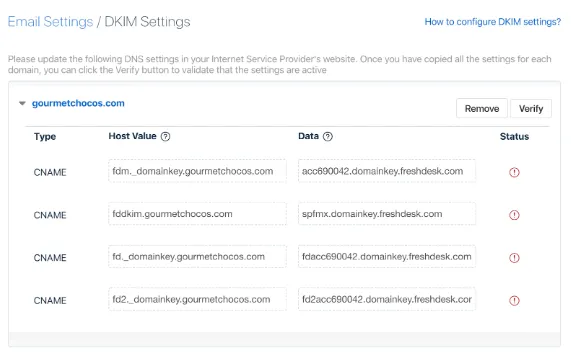
    Freshdesk email settings showing SPF and DKIM records
  • Click on ‘Save’.
  • Login to your Freshdesk account and click on ‘Verify’, which will be present in the DKIM configuration page.

DKIM has been successfully set up on your Freshdesk account. You can check your DKIM record using EmailAuth’s free DKIM validator tool.

[ DKIM guide ]

Part of the Knowledge BaseSending-service implementation guides · 365 guides

Enterprise provenance

Why top financial institutions and governments retired their email security dashboards.

Traditional email authentication platforms sell you a dashboard and ask your engineers to do the labour. In high-stakes environments, manual oversight means delayed enforcement, configuration drift and unmonitored shadow domains.

EmailAuth is the agentic email provenance platform. Our agents enforce p=reject, keep third-party senders aligned and move your domains to full RFC 9989 compliance, the new DMARC standard,, with human-in-the-loop auditability.

Governments Large enterprises Tier-1 financial institutions

SaaS · Dedicated tenancy · Air-gapped on-prem · BYOK encryption

[ Keep reading ]

All posts