DomainKeys Identified Mail (DKIM) is an anti-tamper protocol that ensures security of your emails in transit. It uses digital signatures to check that the email was sent by a specific domain. Before setting up DKIM for Mimecast, you will need to create an outbound definition and an outbound policy. You can then generate a pair of public and private DKIM keys on your Mimecast account.
- Setting up a definition on Mimecast.
-
- Login to your Mimecast account.
- Go to the ‘Administration Console’.
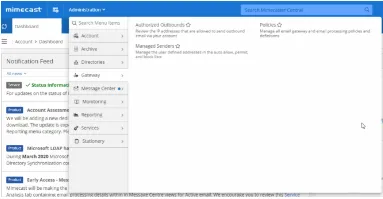
- Navigate to ‘Administration > Gateway > Policies’.
- In the ‘Policies’ tab, locate ‘Definitions’ and select ‘DNS Authentication-Outbound’ from the drop-down menu.
- To create a new definition, click on ‘New DNS Authentication-Outbound signing’.
- Select your Domain name from the lookup box or type your own domain name.
- Select the length of the definition.
- Click on ‘Generate’.
- After the public key is generated, go to your DNS management console and publish the DKIM key.
- Setting up a Policy on Mimecast
-
- Go to your ‘Administration Console’ on Mimecast.
- Go to ‘Administration > Gateway > Policies’.
- Click on ‘DNS Authentication-Outbound’.
- Search ‘New Policy’ and name it.
- Click on ‘Save’.
To verify the successful setup of the new DKIM policy, you can click on ‘Check DNS’ in your Mimecast account. If you see a verified status, it means you have successfully set up DKIM.
Check your DKIM record using EmailAuth’s free DKIM validator tool.