DomainKeys Identified Mail (DKIM) is an anti-tamper protocol that keeps your emails secure while they are in transit. DKIM uses digital signatures to check that the email was sent by a specific domain.
To set up DKIM for Sparkpost, you need to ensure that you have added your sending domain beforehand. If you haven’t added your sending domain, follow the next few steps before setting up DKIM on Sparkpost.
- Log in to your Sparkpost account here.
- Go to the Domains create page by clicking here.
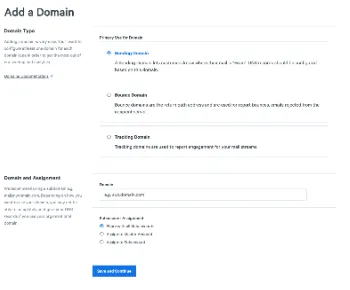
- Add a Sending Domain and click on ‘Save and Continue’.
Now that you have added a sending domain to your Sparkpost account, it is time to set up DKIM.
Follow the next few steps to do just that!
- Go to your Domain’s DNS settings in Sparkpost, and on the Domain Details page, find DNS verification.
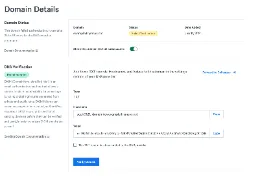
- Copy the record value and name, and publish them in your DNS management console.
- Once you have done that, wait for 24 hours before going back to Sparkpost and clicking on ‘Verify’ on the Domain Details page.
Sparkpost will verify your DKIM records after it has been set up successfully.
Check your DKIM records using our free DKIM validator tool.