[ Setup article ]

How to Add a DKIM Record in Namecheap?

1 min readBy Team EA

Namecheap DNS editor showing DKIM record values

DomainKeys Identified Mail (DKIM) is an anti-tamper protocol that ensures your mail remains secure in transit. DKIM uses digital signatures to check that the email was sent by a specific domain.

The steps for setting up DKIM on Namecheap are more or less the same as other portals. Follow these simple steps to secure your emails with DKIM :

  • Login to your Namecheap account.
  • Navigate to ‘Domain List’ located on the left and look for your domain.
  • Click on ‘Manage’. A new window will appear. 
  • Select ‘Advanced DNS’ from the available options.
  • Click on ‘Add New Record’.
  • Under ‘Type’, select ‘TXT record’ and add a string in the ‘Value’ field.
  • For ‘Hostname’, add your domain name in this form: something._domainkey.
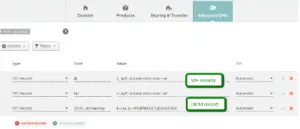
    Namecheap DNS editor showing DKIM record values
  • Click on ‘Save All Changes’.

DKIM has been successfully set up and can be verified using EmailAuth’s free DKIM record checker tool.

[ DKIM guide ]

Part of the Knowledge BaseDNS-provider publishing guides · 39 guides

Enterprise provenance

Why top financial institutions and governments retired their email security dashboards.

Traditional email authentication platforms sell you a dashboard and ask your engineers to do the labour. In high-stakes environments, manual oversight means delayed enforcement, configuration drift and unmonitored shadow domains.

EmailAuth is the agentic email provenance platform. Our agents enforce p=reject, keep third-party senders aligned and move your domains to full RFC 9989 compliance, the new DMARC standard,, with human-in-the-loop auditability.

Governments Large enterprises Tier-1 financial institutions

SaaS · Dedicated tenancy · Air-gapped on-prem · BYOK encryption

[ Keep reading ]

All posts