[ Setup article ]

How to Set Up SPF for Mailerlite?

1 min readBy Team EA

MailerLite domain authentication form

The Sender Policy Framework (SPF) is an email authentication system that detects forged sender addresses while the email is being delivered. SPF, on the other hand, is confined to detecting a forged sender claim in the email’s envelope, which is used when it bounces.

Follow these steps to set up SPF on Mailerlite:

  • Log in to your Mailerlite account as an admin.
  • Click on Authenticate and enter the domain of your choice.
  • Now select Show DNS Records. Copy the record created by Mailerlite for your domain.
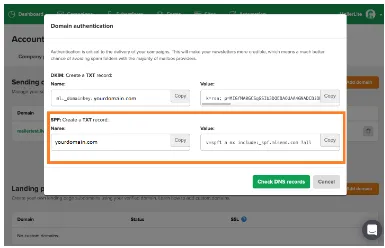
    MailerLite domain authentication form
  • Go to your DNS console and publish the copied records. Wait for 24 hours for the changes to take effect.

Check and verify your records using our free SPF lookup tool.

[ SPF guide ]

Part of the Knowledge BaseSending-service implementation guides · 365 guides

Enterprise provenance

Why top financial institutions and governments retired their email security dashboards.

Traditional email authentication platforms sell you a dashboard and ask your engineers to do the labour. In high-stakes environments, manual oversight means delayed enforcement, configuration drift and unmonitored shadow domains.

EmailAuth is the agentic email provenance platform. Our agents enforce p=reject, keep third-party senders aligned and move your domains to full RFC 9989 compliance, the new DMARC standard,, with human-in-the-loop auditability.

Governments Large enterprises Tier-1 financial institutions

SaaS · Dedicated tenancy · Air-gapped on-prem · BYOK encryption

[ Keep reading ]

All posts